
Pin The Place Logo

FAQ & Help

Everything you need to know about playing, hosting, and creating on PinThe.Place

How do I play the Pin The Place multiplayer game?

Host the game on a main screen (like a TV or projector) and have players scan the on-screen QR code with their mobile devices. Players can then pin their answers on the map directly from their phones in real-time.
What kind of geography quizzes are available?

We offer a massive variety of categories! You can test your knowledge on:

  • Filming Locations: Guess where famous movies and TV shows were shot.
  • POV Travel: Identify the city from walking tour videos.
  • Flags & Trivia: Classic geography challenges with a map-pinning twist.

Can I create my own geography quiz?

Quiz Settings

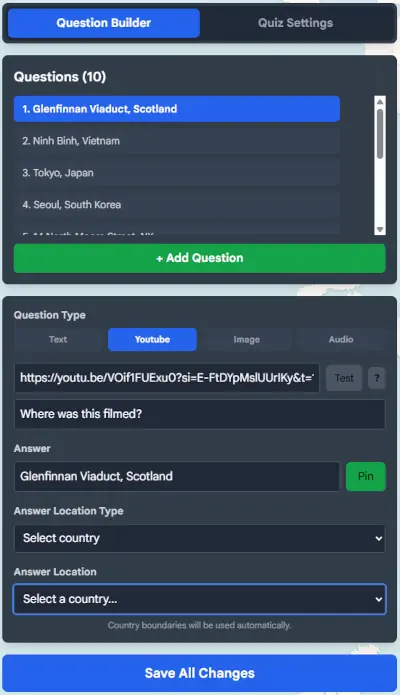
Absolutely! Pin The Place allows users to create their own custom interactive map quizzes. You can use your own images or video links and share them with the community or use them for private events.

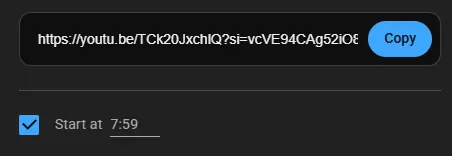
On here is where you add or delete questions. There are 4 different question types. For YouTube videos, simply click 'share' on YouTube and copy the URL. You can also click on 'Start at xx:xx' checkbox to make the video start at a specific time. Please note that the audio will not start as these are the way Youtube Embed URLs work. Youtube Share You can verify your link instantly by clicking the 'Test' button.
There are 3 different Answer Location types:
Pin the Place: Simply click on the world map to manually enter your answer, or type in an Answer text, and click the 'Pin' button to automatically pin based on the Answer. When a user plays this type of question, the score will be based on how close to the pin they get. Within 25km and you get a perfect score of 5000 pts.
Select Country: you will select a country form the drop down list, a polygon or set of polygons will be drawn automatically on the world map. When the user plays this type of question they get 5000 pts when they click within the polygon or 0 if they click outside (even if very close).
Draw an Area: you will draw a polygon by clicking on the map and adding vertices. They will automatically form a polygon as soon as you have placed 3 vertices. You can click on an already placed vertice to remove it, or click Clear Polygon to clear all placed vertices. The scoringg system is the same as for Select Country.

Quiz Settings

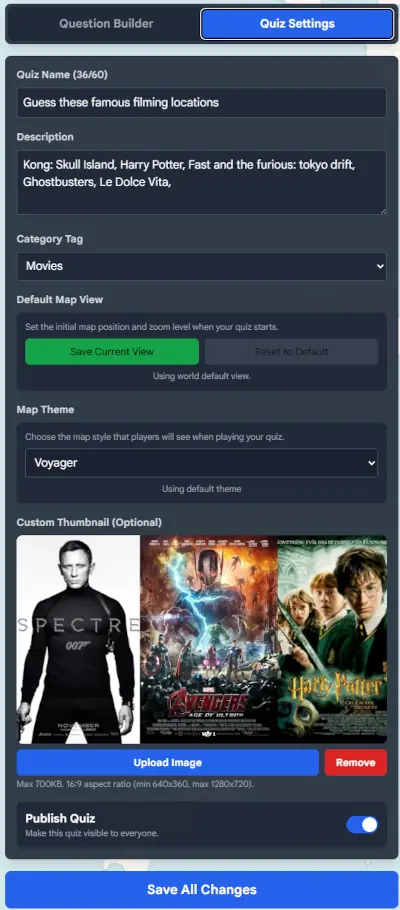
Category Tag: Please choose a tag that ressembles your category the closest. If it is based on Movie or TV filming locations, then choose Movies. In this example choosing movies will make it appear when you click the Movies button from the main page. also you can view the tags by viewing the url directly with ?tag=Movie, for example: https://pinthe.place/?tag=Movies.
Save Current View button will save the position of the World map currently displayed on your map. So for example if your quiz is for a certain country like States for the United States, then you can save your default view zoomed in on the US. This will somewhat work on mobile except be a lot more zoomed in.
Please not that images uploaded for thumbnails must fit the same aspect ratio as 16:9. After uploading the image will be converted and compressed into webp at 640x360.
To publish the quiz and make it available to the public, you will need to have at least 5 questions and make sure that the published toggle is enabled.

Is Pin The Place free to use?

Yes, Pin The Place is free to play. You can jump into single-player quizzes or host a multiplayer session with friends right from your browser.